Eve Creates Instagram account

Notion widget for your 12-week year setup? Yes, please!

Hey, fellow Notioneers!

Are you using the 12-week-year framework to reach your goals? If so, you’re definitely not alone. The book “The 12 Week Year” has been incredibly popular recently, and many of us have adopted its principles to improve our productivity and achieve our objectives.


My Approach to the 12-Week Year in Notion

So, currently, in my goal-setting process within Notion, I use Notion tables to create calendars for each quarter of the year. I create them manually, cell by cell. Then, I pop them into a synch block and use them wherever I need them.
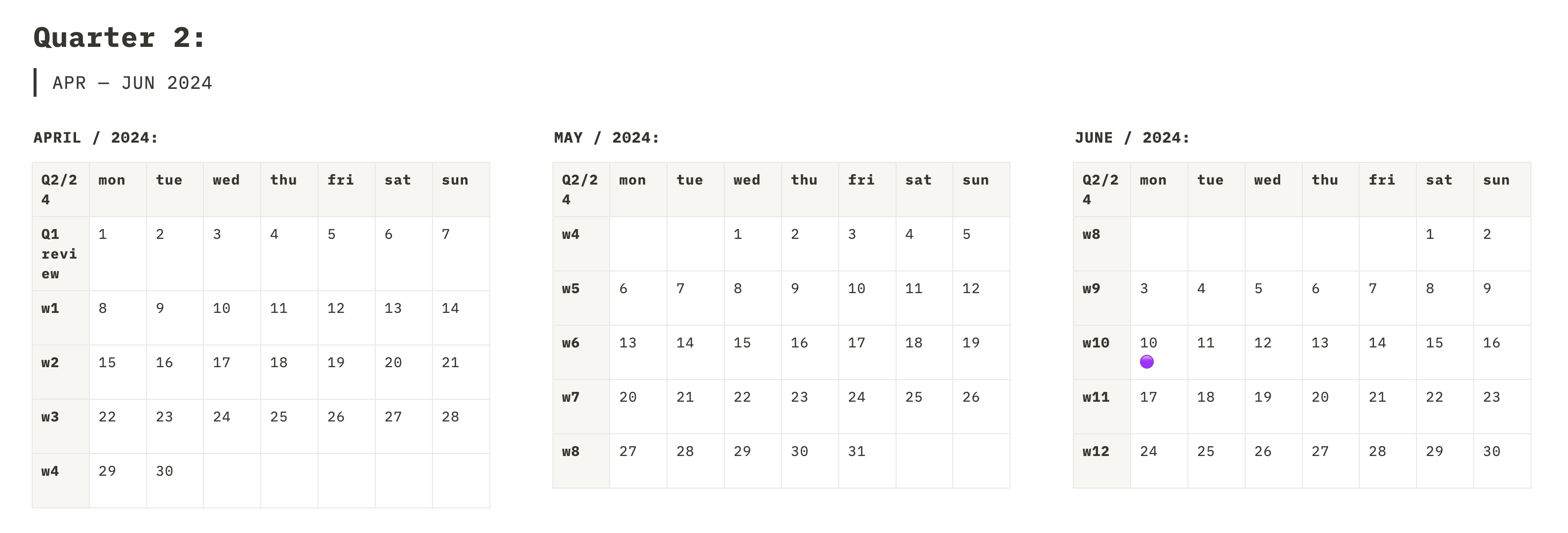
Here’s how I set it up:

  • Quarterly View: I can see all 12 weeks (or three months) at a glance, right above my goals for the respective quarter.
  • Week Numbering: Each week in the 12-week system is numbered (w1, w2, etc.), allowing me to see where I am in terms of my progress.
  • Current Day Marker: A purple dot indicates the current day within the quarter, helping me stay on track with my goals.

This setup helps me see where I am in terms of my goals, and has been quite a helpful tool so far, but manualy creating (and updating!) these calendars can be quite time-consuming.


The Idea: A Custom Calendar Widget

Given the manual nature of creating these calendars, I thought to myself – I am a developer; why don’t I build a widget for this specific purpose? I have the skills to create a tool that not only simplifies this task but also enhances its functionality.


Features of the Proposed Widget

This is what I am thinking so far:

  1. Fixed monthly calendar: This widget should have the ability to fix each calendar to a specific month, so when it is embedded in the Notion, it does not change with time (very much like the table calendar you can see in the screenshot above)
  2. Week Number Display: The calendar should display a number in front of each week within the 12-week system.
  3. Dynamic Current Day Marker: The calendar should feature a dynamic marker (like the purple dot in my current setup) to indicate the current day.
  4. 12-Week Period Display: The widget should be able to display fixed-date calendars for the entire 12-week period.
  5. Notion Style Compatibility: The widget itself should match Notion style, as the rest of the widgets I previously built – light & dark mode, Notion fonts and colours, etc.
  6. Responsive Design: And, of course, it should be responsive so it looks good on any size screen – mobile or desktop.

Moving Forward

This list of features might change as I start working on the widget, but I think it’s a solid starting point. Automating this process will not only save time but also ensure consistency and accuracy in tracking the 12-week goals.

I’m actually excited to develop this tool and share it with you all. Stay tuned for updates, and feel free to share any additional features you think would be helpful.

Let's continue to achieve our goals, one 12-week year at a time!

Recent posts:

Newsletter

Signup for news, updates and special offers!

© 2024 Eve Creates. All rights reserved. A website by Eve At Work